
Case Study: Recovering a Compromised WordPress Website
- Chrisna Erasmus

- Jun 9
- 3 min read
When most business owners think of a hacked website, they imagine a homepage defaced with strange messages or obvious signs that something is wrong.
The reality is often much more subtle.
Recently, we were contacted by a client whose website appeared to be functioning normally. The homepage loaded, the content was intact, and there were no obvious signs of trouble. However, behind the scenes, Google had flagged the website for deceptive content, and thousands of spam pages had been indexed.
What followed was a full investigation, cleanup, and security hardening process.
The Initial Warning Signs
The first indication of a problem came from Google Search Console, which reported security issues on the website and warned that deceptive content had been detected.
Further investigation revealed that the website had generated an enormous number of spam URLs. Although the business only had a handful of legitimate pages, search engines had indexed more than 180,000 URLs associated with the domain.
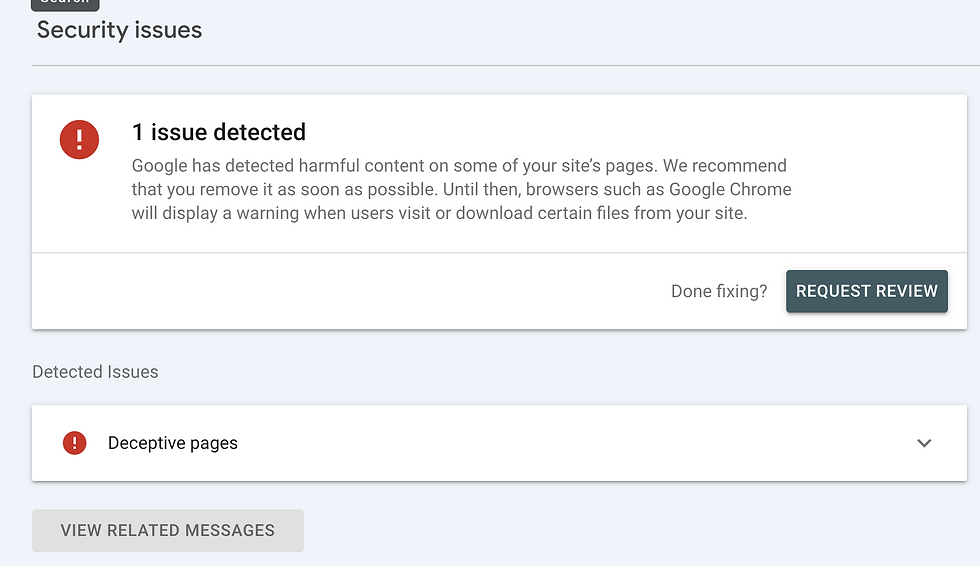
At this point, it was clear that the website had been compromised.
Investigating the Infection
Website malware rarely exists in just one place.
During our investigation, we identified multiple suspicious files and malicious scripts hidden throughout the hosting environment. Some of these files were designed to allow attackers to regain access to the website even after visible spam pages had been removed.
The challenge with WordPress compromises is that simply deleting the visible spam pages is often not enough. If the underlying access point remains in place, the infection can return within days.
Our investigation focused on:
Identifying malicious files and backdoors
Reviewing recently modified files
Auditing installed plugins and themes
Verifying WordPress core files
Reviewing server-level configurations
Monitoring for signs of persistence or reinfection
Cleaning the Website
Rather than rebuilding the website from scratch, we worked with the existing installation.
The cleanup process included:
Removing malicious files and backdoors
Reinstalling clean WordPress core files
Removing unused and unnecessary plugins
Updating WordPress, themes, and plugins
Resetting administrative credentials
Reviewing hosting configurations
Verifying that no unauthorised users remained
Once the cleanup was complete, multiple scans were performed to confirm that no active malware remained.
Hardening Against Future Attacks
Removing malware is only half the job.
Without additional security measures, a vulnerable website can easily become compromised again.
To reduce the risk of reinfection, we implemented several security improvements:
Enabled and optimised the Wordfence firewall
Activated brute-force protection
Disabled XML-RPC access
Added CAPTCHA protection to website forms
Removed unused software and plugins
Enabled automatic updates
Disabled file editing within WordPress
Implemented ongoing monitoring and alerting
These changes significantly reduced the website's attack surface.
The Results
Following the cleanup and hardening process:
Malware scans returned clean results
No new malicious files were detected
No signs of reinfection were observed during monitoring
Security review requests were submitted to Google
The website remained stable and fully operational
Most importantly, the client's existing website, content, and investment were preserved.
What Business Owners Can Learn From This
One of the biggest misconceptions about website security is that a website only needs attention when something goes wrong.
In reality, security is largely preventative.
Regular updates, monitoring, backups, and security reviews are often what prevent small vulnerabilities from becoming major incidents.
If your website has received a security warning, is generating unusual URLs, or has experienced a sudden drop in search visibility, it may be worth investigating before the problem escalates.
A compromised website does not always look broken. Sometimes the warning signs are only visible behind the scenes.
Need Help With a Compromised Website?
If you suspect that your WordPress website has been hacked, infected with malware, or flagged by Google, Erasmus Digital Media can assist with investigation, cleanup, security hardening, and ongoing maintenance.
The sooner a compromise is addressed, the easier it is to contain and recover from.


Comments